We receive your message
Your child's age, preferred location and booking preference are sent to us via WhatsApp.
Meta Robotics' STEM Programme is a hands-on STEM, robotics, coding, game design and AI learning journey for children aged 3 to 16 in Singapore. Students learn mathematics, science, engineering and technology by building physical models, conducting experiments, programming robots, creating digital projects and exploring how artificial intelligence learns.
Every concept starts as something your child can hold.
IF this happens, THEN the robot responds — instantly.
More data, more confidence — that's how AI learns.


Parents can finally see their child understand a concept — not just recite it. Every model does one of three jobs.
Fractions, ratios and percentages built brick by brick — not on a worksheet.
¼ + ¾ = 1Prediction → experiment → observation. The child discovers the law, not memorises it.
predict → test → explainEvery model is a trade-off — speed vs. torque, strength vs. weight — solved by hand.
every model, a problemSchools teach Mathematics, Science and Physics as separate subjects — each with its own textbook, its own hour, its own test. In the real world, they're never separate. STEM means applying Science, Technology, Engineering and Mathematics together, the way engineers, scientists and builders actually work.
Standalone topics. Taught separately, tested separately, rarely connected.
Applied together — inside one model, one build, one class.
Mathematics: the 24:8 ratio. Science: force, motion and friction. Engineering: the mechanism that makes it turn. Technology: the sensor that reads it. Four "subjects" — taught as one build, the way they actually show up in the world. Try the gear ratio demo →
Let Your Child Experience STEM Differently
Book a Discovery Session →From building a model to training an AI — every class moves the story forward, so no two weeks feel the same.
Find the Right Starting Point for Your Child
Book a Discovery Session →We don't just teach children how to build robots. We teach them to understand how the world works, code how machines behave, create their own digital worlds, and train the intelligence of the future.
Six interactive demos, built from the same models your child builds in class. Pick one below — every slider, button and brick actually responds.
Switch topics below — every wall and grid responds instantly.
"Can your child actually see what ¼ means?"
Watch: Introduction to FractionTap ⅛, ¼, ½ or ¾ to fill that fraction of the wall instantly.
Tap individual bricks — the fraction updates as you go, no worksheet needed.
3/8 stays 3/8. But 2/8 simplifies to ¼ — live, so the "why" is visible.
"Why does 4 × 6 equal 24?"
Addition, subtraction, multiplication or division — same two groups of bricks, four different questions.
Drag Group A and Group B and watch the bricks rebuild live.
Multiplication becomes a grid. Division becomes equal groups, with any remainder shown separately.
"Your child can literally build area — and see why it isn't the same as perimeter."
Watch: Understanding PerimeterDrag width and height — the grid rebuilds itself, brick by brick.
Area counts every stud inside. Perimeter counts only the outside edge.
A long thin rectangle and a square can share a perimeter — but never the same area.
"Can mathematics predict how far this robot travels?"
Drag the speed slider — how many studs the robot covers every second.
Drag the time slider — how many seconds the robot gets to travel.
Distance = Speed × Time. Guess the number before the robot moves — then check.
"If the big gear turns once, how many times will the small gear turn?" — 24 teeth vs. 8 teeth.
A 24-tooth gear drives an 8-tooth gear — three times fewer teeth.
Watch the small gear complete three full turns for every one turn of the big gear.
24:8 simplifies to 3:1 — the same ratio, shown two ways: as numbers, and in motion.
Change one thing at a time — surface, push, ramp, wind-up, or mass — and watch how far it travels.
"The vehicle is the same. The force is the same. The variable we changed is the surface."
Watch: Reducing Friction"Parents, which vehicle do you think will travel further?" Parents guess first — on camera, out loud.
The child runs the test, live — no script, no worksheet, just the model and the surface.
Together, we unpack the result and the concept behind it — friction, in this case.
An invisible pull or push between magnets — attract or repel, with no touching required.
A compressed or stretched spring always pushes or pulls back toward its original shape.
The inward force that keeps an object moving in a curved or circular path. The outward sensation you feel when turning is often described as the centrifugal effect.
The upward push of water — or air — that keeps a boat, or a robot, afloat.
Electricity and magnetism working together — the force spinning every motor in your models.
"Would a harder push always mean it goes further?"
"Parents, how far do you think a gentle push will send it — versus a hard one?"
Same vehicle, same surface — only the strength of the push changes.
More force means more motion — the same idea behind every push, kick and launch.
"Does a steeper ramp always mean more speed?"
"Parents, will doubling the ramp height double the distance — or more?"
Same vehicle, same starting push of zero — only the ramp height changes.
Height stores energy. The taller the ramp, the more gravity has to give back.
The energy of motion. A rolling robot, a spinning wheel — anything moving has it.
Stored energy waiting to happen. A raised gear, or a ball at the top of a ramp.
Stored in a stretch or squeeze — a wound rubber band, or a compressed spring.
Energy from the sun. Solar panels turn light into electricity to power a circuit.
Energy from moving air. A turbine's blades spin, ready to be built and tested.
Energy that travels as visible light. Sensors and solar cells can "catch" it.
"Does pulling it back twice as far really launch it twice as far?"
"Parents, does pulling back 3 times as far launch it 3 times as far?"
Same band, same anchor point — only how far back it's pulled changes.
Stretching stores energy. Releasing turns that stored energy straight into motion.
"Does a heavier vehicle start moving as easily as an empty one?"
"Parents, will adding bricks make the same push travel further or less far?"
Same push, same surface — only the number of bricks loaded on top changes.
Mass resists acceleration. The heavier the vehicle, the less distance the same push achieves.
Seven mechanisms, seven problems — switch topics to try each one.
Load: 60 kg, fixed at 40 cm from the pivot. Effort: only 20 kg — but you choose the distance.
60 kg, always 40 cm from the pivot. Your child can't move it — that's the problem to solve.
Only 20 kg to push with. Drag the slider to change how far it sits from the pivot.
At the right distance, a lighter weight lifts a heavier one. That's mechanical advantage.
"Can a smaller motor lift a heavier object?"
80 kg, always. No amount of clever building changes what needs lifting.
Each extra pulley shares the load across another length of rope.
4 pulleys means a quarter of the force — but four times the rope pulled.
"How does spinning become back-and-forth?"
Drag the slider — that's rotary motion, spinning all the way around.
The rigid arm connects the spinning crank to the sliding block.
The block only moves back and forth — the same principle behind engine pistons.
"Why are triangles used in bridges?"
Build the same size frame as a square, a rectangle, a triangle or a circle.
Push sideways on every frame with the same force.
Square and rectangle shear into a parallelogram — the taller the frame, the worse it gets. The triangle holds firm by triangulation. The circle holds firm too, but for a different reason: no corners means the force has nowhere to concentrate.
"Why do racing cars sit so low?"
A tall vehicle or a low one — same sharp corner ahead.
Both vehicles take the same turn, at the same speed.
A lower centre of gravity keeps more of the vehicle's weight close to the ground.
"Why do two strips of paper pull toward each other when you blow between them?"
Watch: Real World Application of Bernoulli's PrincipleTwo paper strips hang side by side, straight down.
Drag the slider — that's you blowing harder between the strips.
Faster-moving air has lower pressure — so the still air outside pushes the strips in.
"How does a small push lift something heavy?"
10 kg of force, always — that never changes.
Pick how much bigger the large piston is — 2×, 4×, or 8× the area.
Pressure is shared equally through the fluid — so a bigger piston means a bigger force out.
Now it has to think, sense and respond. Switch topics to try both kinds of logic.
"IF movement is detected → turn motor → play alarm → display warning."
Nothing happens until an event occurs — that's the "IF" in event-driven programming.
Motion is detected. The program moves from waiting to acting.
Motor, then alarm, then warning — a sequence, triggered by a single event.
"IF distance < 10 cm → STOP, REVERSE, TURN. ELSE → MOVE FORWARD."
The robot constantly measures its distance from the wall.
Is the distance less than 10 cm? That single comparison decides everything next.
IF close, stop and turn away. ELSE, keep driving forward.
Five ways to create — from a first story to a full space-shooter game.
"Tap the blocks in order — that order is the story."
Watch: Introduction to Scratch 3.0 (Part 1)Each block is one moment in the story.
The order you tap is the order the story plays — that's sequencing.
Four blocks, one story — the same logic behind every animation your child makes.
"IF touching wall → return to start. IF touching treasure → change score by 1."
Watch: Introduction to Scratch 3.0 (Part 2)Use the arrows — each tap runs one movement block.
Touch a wall and it's game logic: back to start.
Touch treasure and the score variable changes — real game logic, one block at a time.
"Same lane as the enemy? Fire!"
The 🛸 appears in one of three lanes, just like a Pygame sprite's x-position.
Tap the matching lane — that's a collision check between player and enemy.
Wrong lane costs a life. Three misses and the game state changes to "over."
"Animation is just still pictures, shown quickly."
One character, drawn in four slightly different poses.
Play cycles through them — the higher the FPS, the smoother it looks.
No magic — just still frames, shown fast enough to trick the eye.
"IF you choose left → one story. ELSE → a different one."
The story pauses and waits for input — just like a Scratch "ask" block.
IF left is chosen, run one set of blocks. ELSE, run a different set.
Same story, same start — but the choice changes everything after it.
Five different AIs, five different jobs — from sorting recycling to reading a room.
"AI is only as good as the data used to train it."
Watch: Machine Learning BasicsTrain the AI first, then test it on a new item.
Show the AI examples of plastic, paper and metal.
More examples of a category means a more confident model for that category.
Give it an item it hasn't seen — and see how confident (or unsure) it is.
"Can a computer learn to recognise how a sentence feels?"
Watch: Pattern RecognitionTap a phrase to classify it.
The model learns from many phrases already labelled happy, sad or angry.
Tap a phrase — the model predicts the closest emotion it learned.
AI doesn't just answer — it tells you how sure it is, too.
"Can a camera learn to read a hand signal?"
Show a gesture to control the character.
The model was trained on images of each hand signal.
It matches your gesture to the closest one it learned.
Recognition becomes input — no keyboard, no controller.
"Can AI tell a real message from a scam?"
Tap a message to classify it.
The model trains on thousands of messages already marked spam or not.
Urgency, prizes, and "click now" are patterns real spam shares.
The model doesn't just block — it tells you how sure it is, so a human can double-check.
"Can a pet 'learn' how you treat it?"
Feed, play or ignore — each one shifts the pet's mood score.
Mood is cumulative — it reflects every interaction, not just the last one.
The same idea behind AI systems that adjust based on your history.
Turn These Ideas Into Real Builds
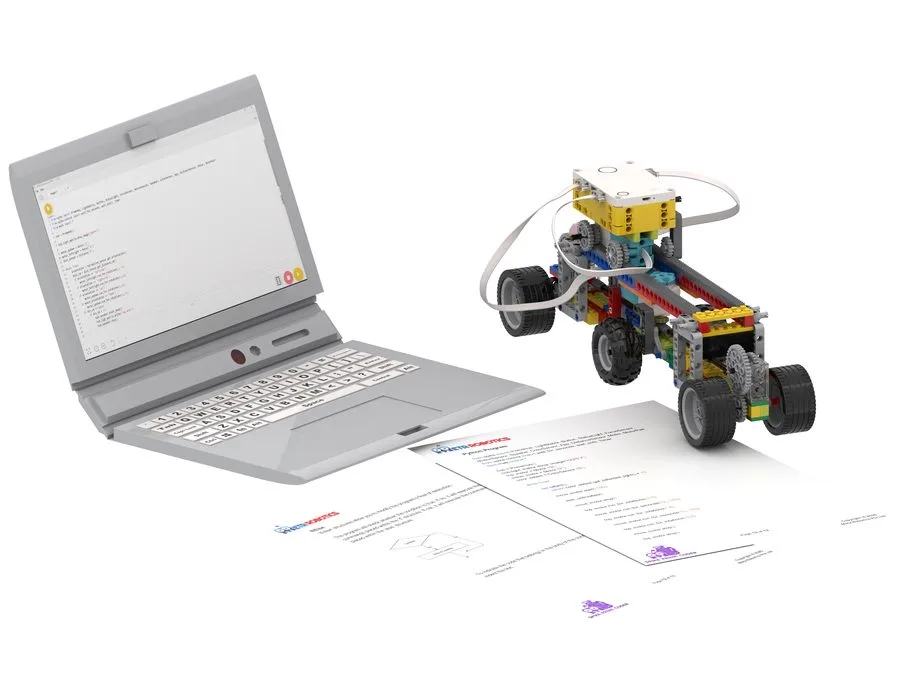
Book a Discovery Session →Every class comes with an actual build, a matching worksheet, and an exit card that checks understanding — not just play. Here's a peek across different age tiers.
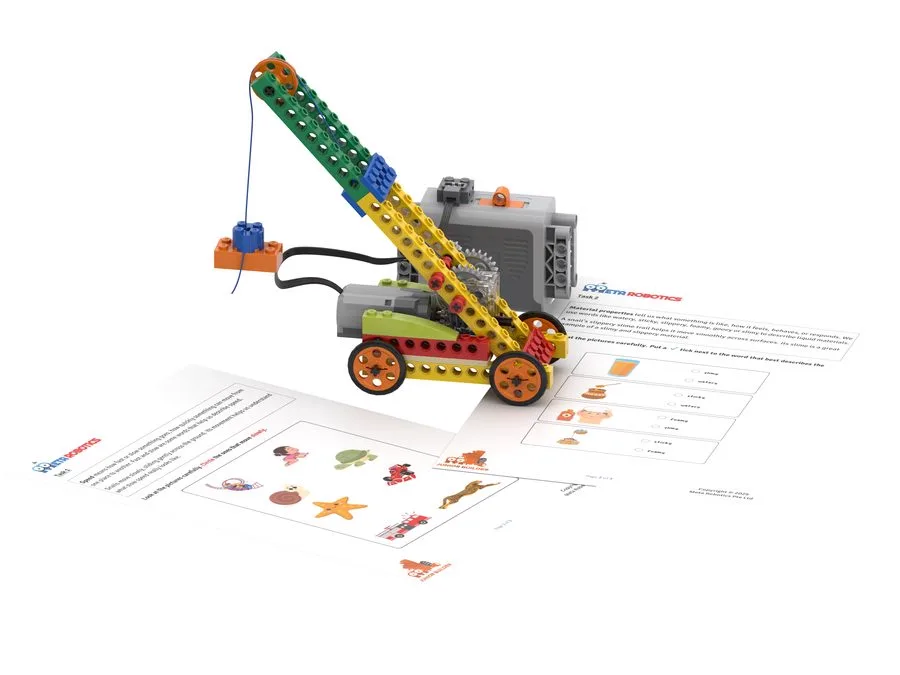
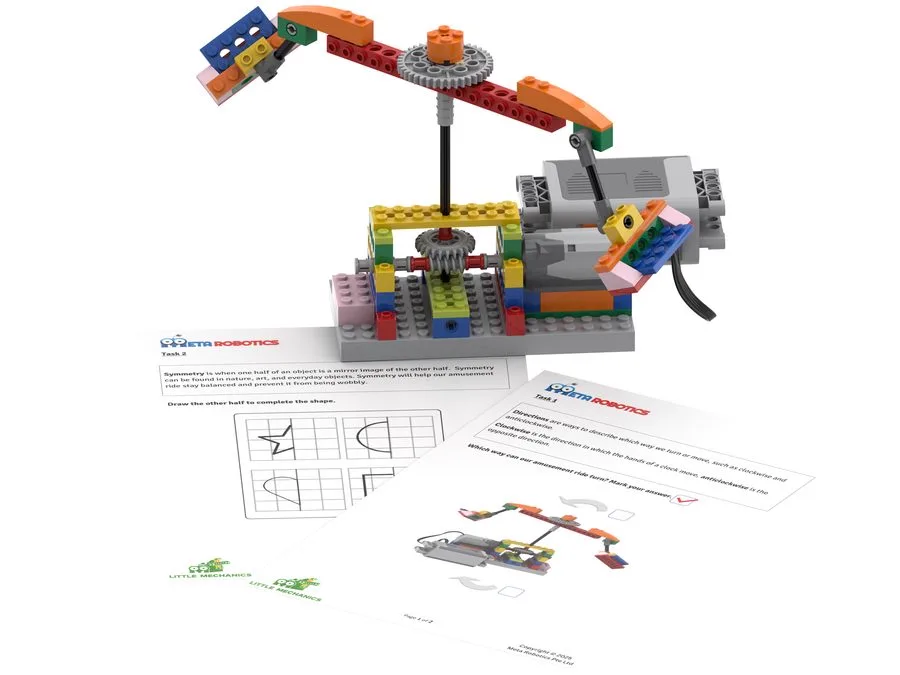
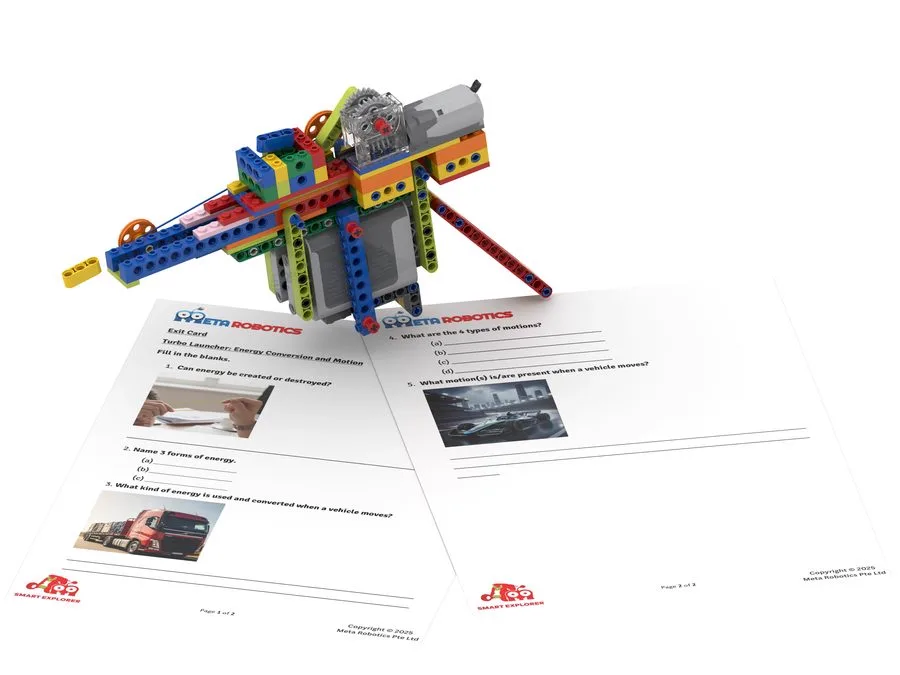
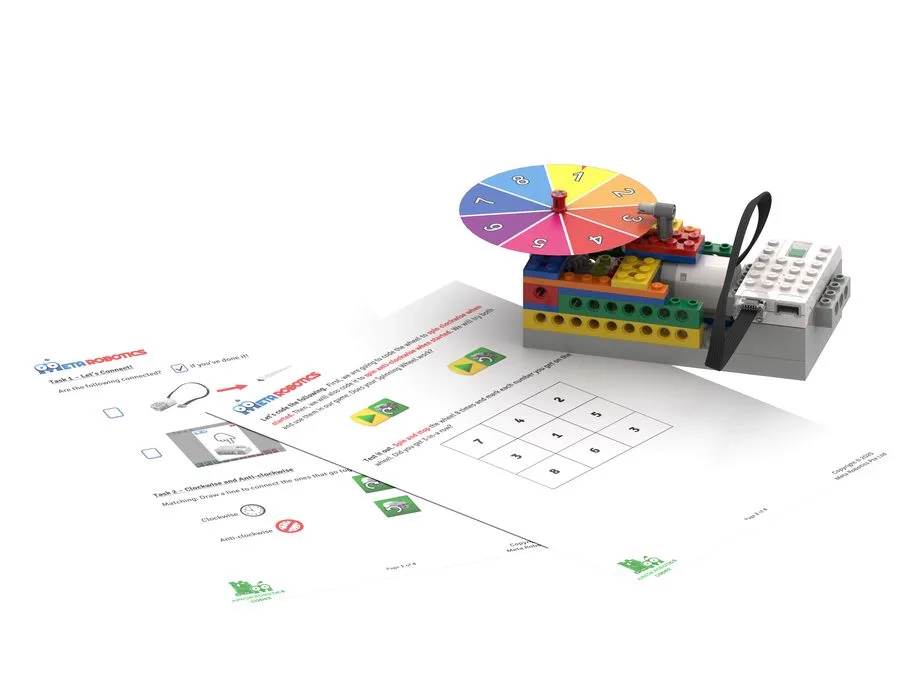

Not a stock photo — real instructors, real kids, real excitement when something finally clicks.


From first-time builders to national finalists — a few of the journeys we're proudest of.
Two years into the programme, Caspian won 3rd Place in the WRO Regular Category (Primary) at the National Robotics Competition 2021 — then secured a confirmed offer under DSA-Sec 2022.
From Top 10 Finalist at NRC 2021, to winning the Best Content Award — 1st Prize — at NRC 2022, to an Innovation Project Award at First LEGO League 2022.
Three young builders, three 3rd-place finishes in the WeDo Junior Regular Category at the National Robotics Competition 2021 — proof that podium finishes start young.
Both completed the Ace Module and progressed to King — the top tier of our development pathway — showing what steady, year-on-year building looks like.
Recognised for teamwork and sportsmanship at First LEGO League 2022 — a reminder that we're building character alongside circuits.
Book Your Child's Trial Class
Reserve my $30 trial →Reasonable questions deserve honest answers — here are the five we hear most often.
That's exactly why every class rotates through four different worlds — STEM (Math, Science & Engineering), Coding, Game Design and AI. Most children find at least one they genuinely love, and many discover an interest they didn't know they had. Scroll up and try any of the live demos on this page — that's a real taste of what a class feels like.
Every model does double duty. The same gear box that teaches a ratio also teaches force, mechanism design and sensing — see "One gear box, four subjects" above. It's built-in STEM integration, not a toy with a lesson bolted on afterwards.
It's designed to reinforce school concepts, not compete with them. Fractions, ratios, forces and geometry are the same ones taught in the school syllabus — children often come back to class understanding them better, not confused by two different explanations.
Our programmes span ages 3 to 16 — from Meta Robotics Junior's play-based introduction for our youngest learners, right through to advanced builds and challenges for teens. Every class is pitched to the child's stage, not a one-size-fits-all curriculum.
Most programmes teach one narrow skill in isolation — just Scratch, or just brick-building. Meta Robotics rotates through four connected worlds, so the same child who built a gear box last week is training an AI model this week. Nothing gets stale, and every class builds toward something bigger.
Every student on that list started exactly where your child would — as a complete beginner. Our development pathway moves in stages over time, so competition placings are the result of steady, ordinary practice, not rare talent. Most families never chase a competition at all, and that's completely fine too — the everyday win is a child who understands a concept confidently.
Entirely optional. Most students attend simply to learn and enjoy the classes and never enter a single competition. For those who do want an extra challenge, we help them prepare — but it's never a requirement to get value from the programme.
Most parents notice a shift in confidence within the first few classes — a child explaining a concept unprompted, or asking to build at home. Deeper milestones, like the competition results above, are typically the result of a year or more of steady, regular classes, not a quick fix.
Reserve Your Spot
Experience our build-and-code approach through a hands-on class matched to your child's age and stage.
Looking for a more personalised assessment?
A focused assessment designed to understand your child's current abilities, learning approach and recommended robotics learning pathway.
📍 Currently available at Novena & Katong only
ℹ️Good to know: After completing the RDA, you're free to enrol at any Meta Robotics centre that's most convenient for you.
Find Out About RDA →Book Your Child's Class
Send us a WhatsApp message and we'll take care of the rest.
Your child's age, preferred location and booking preference are sent to us via WhatsApp.
Our friendly team will get in touch to understand your needs and discuss suitable options.
We'll help you find a suitable session. Once you've selected your preferred slot, we'll guide you through the S$30 payment to confirm your booking.